


Your AI Humanizer,
Right in Your Browser
Select any text, right-click, and humanize instantly. Works on Google Docs, Gmail, ChatGPT, and every website you visit.
 Chrome
 Edge
Edge
 Brave
Brave
 Opera
Opera
Works Where You Work
Access powerful AI humanization tools without leaving your workflow.
Right-Click Menu
Select any text, right-click, and choose "Humanize" or "Detect AI" instantly.
Sidebar Panel
Open the full humanizer tool in a side panel without leaving your page.
Smart Toolbar
A floating toolbar appears when you select text for quick actions.
Keyboard Shortcuts
Use Ctrl+Shift+H to humanize instantly.
Powerful AI Writing Assistance
Transform AI-generated text into authentic, human writing with powerful tools at your fingertips.
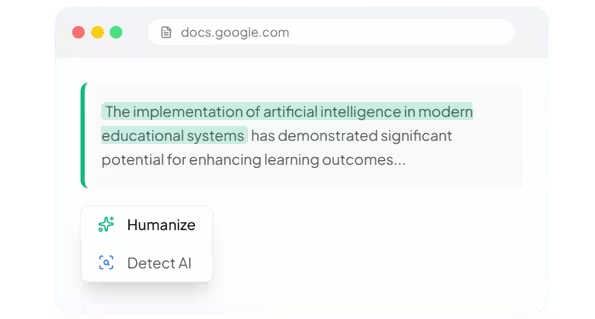
Transform AI to Human Writing
Select any AI-generated text, right-click, and choose "Humanize." Your text is instantly rewritten for improved clarity and natural flow while preserving its original meaning.
-
Improves readability and natural language flow
-
Preserves original meaning and context
Check Before You Submit
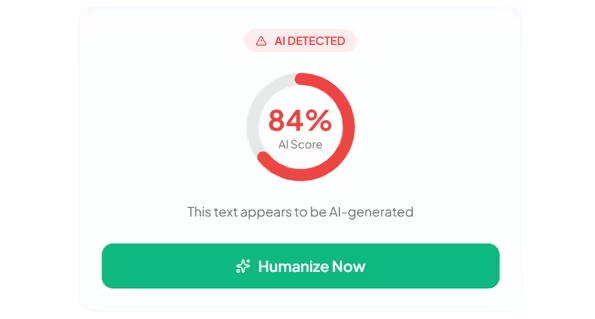
Not sure if your text will pass? Use the built-in AI detector to check any text before submission. Get instant feedback on AI probability scores.
-
Instant AI probability score
-
One-click humanization if AI detected
Write for Every Occasion
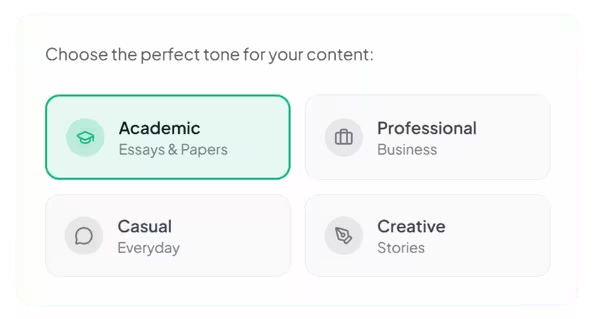
Choose from multiple writing tones to match your audience. Academic for essays, Professional for business, Casual for social media, and Creative for storytelling.
-
4+ writing tones available
-
Pro tones unlock with upgrade
Works on Every Platform You Use
Seamlessly integrates with all your favorite tools and websites.




Humanize AI Text in Seconds
No complicated setup. Install once and start humanizing AI content anywhere.
Install Extension
Click "Add to Browser" and the extension installs in seconds. Free, no account required.
Select Your Text
Highlight any AI-generated text on any webpage — Google Docs, emails, ChatGPT, anywhere.
Right-Click & Humanize
Choose "Humanize" from the menu. Your text is instantly transformed into natural human writing.
Stop Copy-Pasting.
Start Right-Clicking.
The extension brings NinjaHumanizer directly into your workflow. No more switching tabs or copy-pasting text.
-
Same quality rewriting as the web version
-
AI Detection built-in — check any text with one click
-
Syncs with your account for unlimited access with Pro
- Copy text
- Open new tab
- Paste into tool
- Click humanize
- Copy result back
- Select text
- Right-click
- Click "Humanize"
- —
- —
Frequently Asked Questions
Everything you need to know about the browser extension.
Is the browser extension
free?
Yes! The browser extension is completely free to install. Free users get 3 humanizations per day. Sign in with your NinjaHumanizer account for unlimited access with Pro or Ultra plans.
Does it work on Google
Docs?
Absolutely! The extension works on Google Docs, Gmail, Google Slides, and all Google Workspace applications. Select text, right-click, and choose Humanize or Detect AI.
Does it improve content quality?
Yes. Our AI humanizer rewrites content to improve clarity, tone, and natural language flow. It helps make AI-generated text sound more human and easier to read.
Which browsers are
supported?
The extension works on Google Chrome and all Chromium-based browsers including Microsoft Edge, Brave, Opera, and Vivaldi.
Is my data private?
Yes. We use end-to-end encryption for all text processing. Your content is never stored on our servers and is immediately discarded after processing.

