ChatGPT Writing Sounds Robotic? 10 Ways to Make It Human
ChatGPT can create clear and polished content in seconds, but its writing can sometimes sound repetitive, predictable, or robotic. Learn 10 practical ways to make ChatGPT writing sound more natural and human, from improving your prompts and adding personal experiences to varying sentence structure, removing generic AI phrases, and using AI humanizers effectively.

Sijan Regmi
Co-Founder, Ninja Humanizer

Have you ever generated a piece of content with ChatGPT, read it back, and immediately thought, This sounds like AI?
The grammar is perfect. The sentences are clear. The information is organized. Yet something feels off.
Maybe every paragraph sounds the same. Maybe the writing uses words like "delve," "crucial," and "landscape" too often. Perhaps every section follows the same predictable pattern, with a polished introduction, three perfectly balanced points, and a neat conclusion.
This is what many people mean when they say ChatGPT writing sounds robotic.
The problem isn't necessarily that ChatGPT writes badly. In fact, it often writes very well from a grammatical and structural perspective. The issue is that AI-generated writing can sometimes lack the small imperfections, personal preferences, emotional nuances, and natural variation that make human writing feel authentic.
This can be a problem if you're using ChatGPT to write blog posts, emails, essays, social media content, product descriptions, or marketing copy.
The good news is that you don't have to stop using AI.
You simply need to learn how to turn an AI-generated draft into writing that sounds more natural, personal, and genuinely useful.
In this guide, we'll explain why ChatGPT writing sounds robotic and explore 10 practical ways to make ChatGPT text sound more human without losing the speed and convenience of AI-assisted writing.
Why Does ChatGPT Writing Sound Robotic?
Before fixing robotic writing, it helps to understand why it happens in the first place.
ChatGPT is designed to generate useful, coherent, and grammatically correct text based on patterns it has learned. When you ask it to write something, it often produces an answer that is logically structured and easy to understand.
However, the same strengths can sometimes make the writing feel predictable.
Here are some of the most common reasons ChatGPT-generated content may sound robotic.
1. The writing is too predictable
AI-generated text often follows familiar patterns.
For example:
"In today's fast-paced digital world..."
"Whether you're a student, professional, or business owner..."
"There are several key factors to consider..."
These phrases aren't necessarily wrong. The problem is that they appear frequently in AI-generated content.
Human writers don't always introduce topics in the same way. They might start with a personal observation, an unexpected question, a specific example, or even a short story.
That variation makes human writing feel less predictable.
2. Every sentence is grammatically perfect
Perfect grammar isn't a bad thing, but natural human writing isn't always perfectly uniform.
People vary their sentence length. They use fragments occasionally. They start sentences with "And" or "But." They may repeat a word for emphasis. They might use a short sentence after a long explanation.
AI-generated writing can sometimes make every sentence feel equally polished.
That consistency can create a synthetic feeling.
The goal isn't to intentionally add mistakes everywhere. Instead, the goal is to introduce natural variation.
3. The tone is too formal
ChatGPT often defaults to a professional and neutral tone unless you specifically tell it otherwise.
That can make the content sound distant.
For example:
"It is important to consider the potential benefits associated with incorporating artificial intelligence into your content creation workflow."
A more natural version might be:
"AI can make content creation much faster, but it works best when you treat it as a starting point rather than the finished product."
Both sentences communicate a similar idea. The second simply sounds more conversational.
4. The vocabulary is too sophisticated
AI-generated content can sometimes use unnecessarily complicated words.
Instead of saying:
"use"
it may say:
"utilize."
Instead of:
"help"
it may say:
"facilitate."
Instead of:
"important"
it may say:
"crucial" or "essential."
Again, these words aren't always wrong. But when they appear repeatedly, the writing can feel unnatural.
Good human writing isn't about using the biggest words possible.
It's about using the right words for the audience.
5. The structure is overly symmetrical
ChatGPT loves structure.
Ask it to write an article with 10 tips, and you may get 10 sections that look almost identical:
Introduction
Explanation
Three bullet points
Example
Conclusion
This makes the article easy to scan, but it can also feel formulaic.
Human writers tend to vary their structure naturally.
One section might contain a short story. Another might use a list. Another might explain a concept through an example.
That variation creates a stronger sense of authenticity.
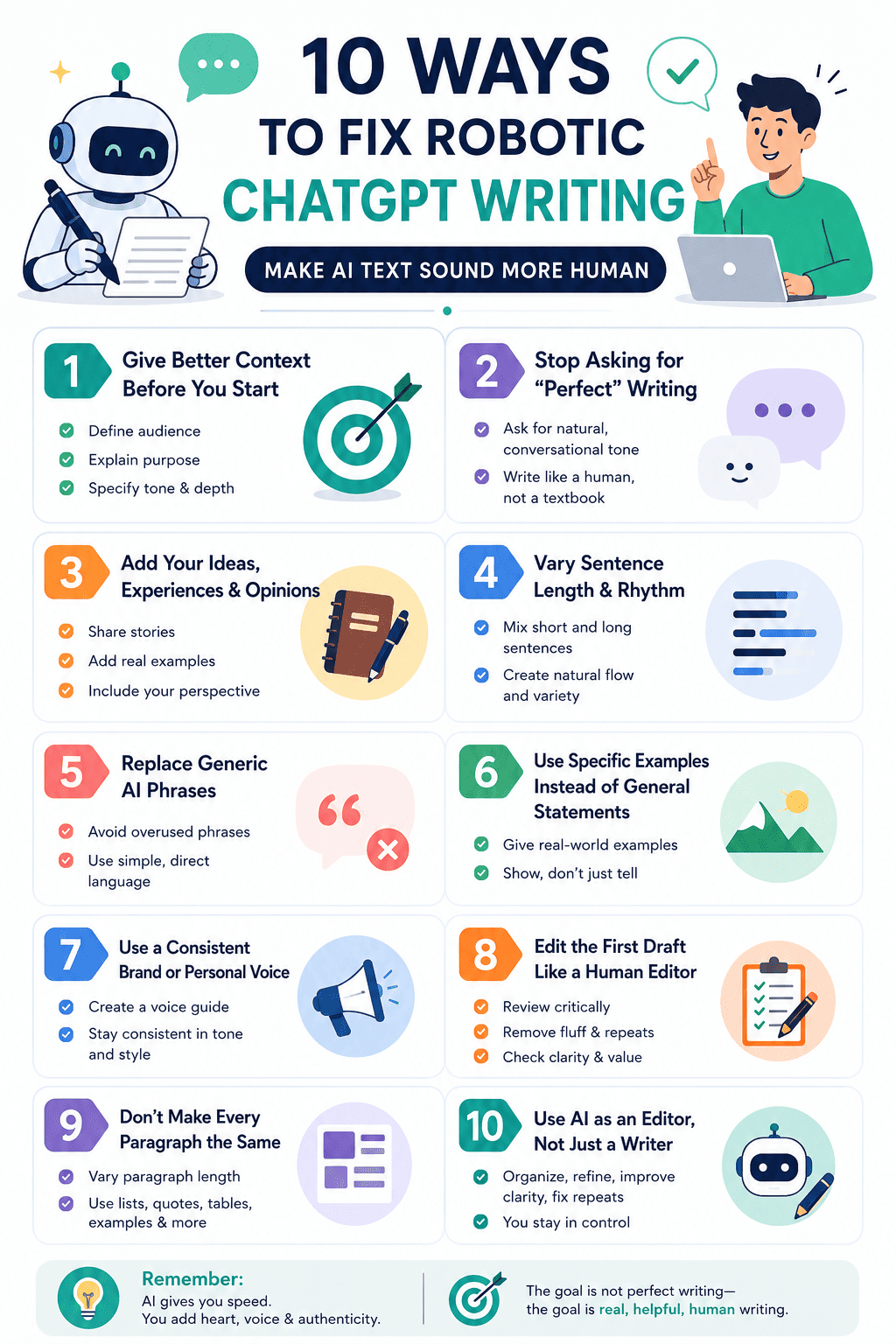
10 Ways to Fix Robotic ChatGPT Writing
Now that we understand the problem, let's look at practical ways to make ChatGPT-generated content sound more natural.
1. Give ChatGPT Better Context Before You Start
One of the easiest ways to improve AI-generated writing is to provide more context.
A vague prompt produces generic content.
For example, compare these two prompts.
Generic prompt:
Write a blog post about AI writing.
The result will probably be broad and predictable.
Now compare it with:
Write a blog post for freelance content writers who use ChatGPT to create first drafts. The audience understands basic AI tools but struggles with making AI-generated content sound natural. Use a friendly, knowledgeable tone. Include practical examples and explain the difference between AI-generated writing and human-edited writing.
The second prompt gives the model much more information.
You're defining:
The audience
The topic
The reader's problem
The reader's knowledge level
The desired tone
The purpose of the article
The more relevant context ChatGPT has, the less likely it is to produce generic writing.
What to include in your prompt
When generating content, consider specifying:
Audience: Who is reading this?
Purpose: What should the reader learn or do?
Tone: Should it be casual, professional, friendly, humorous, or authoritative?
Perspective: Should the content use first person, second person, or third person?
Examples: What kinds of examples should be included?
Depth: Should the content be beginner-friendly or technically detailed?
Instead of asking ChatGPT to "write an article," tell it exactly who the article is for and why it exists.
That single change can make a noticeable difference.
2. Stop Asking for "Perfect" Writing
If you ask ChatGPT to write a "perfect, professional, polished article," you may get exactly that.
And that's sometimes the problem.
Over-polished writing can feel artificial.
Instead, ask for writing that sounds like a knowledgeable human explaining something to another person.
For example:
"Write naturally and conversationally. Avoid sounding overly formal or corporate. Use simple language where possible. Vary sentence length and paragraph structure. Don't force every section into the same format."
You can also specify the personality of the writing.
For example:
"Imagine you're an experienced writer explaining this topic to a colleague over coffee. Be knowledgeable but relaxed. Don't sound like a textbook."
This type of instruction can encourage a more natural voice.
However, remember that prompts alone aren't always enough. AI models have strong default patterns, and those patterns can remain visible even when you give detailed instructions.
That's why editing the output is still important.
3. Add Your Own Ideas, Experiences, and Opinions
One of the biggest differences between generic AI content and authentic human content is personal perspective.
ChatGPT can explain what people commonly say about a topic.
But your own experiences can make the content unique.
For example, imagine you're writing about using AI for content creation.
Instead of publishing:
"AI tools can help content creators save time and improve productivity."
You could write:
"When I first started using AI for blog drafts, I was impressed by how quickly it could produce 2,000 words. The problem came when I tried to publish those drafts without editing them. Everything sounded polished, but nothing sounded like me."
The second version feels more personal because it contains a specific experience.
When using ChatGPT, give it your own raw material.
You can provide:
Personal experiences
Opinions
Examples
Stories
Customer questions
Common mistakes you've noticed
Lessons you've learned
Original data
Real-world observations
Then ask ChatGPT to organize or improve that material.
This is often much better than asking AI to invent everything from scratch.
A useful workflow
Try this process:
Step 1: Write your thoughts quickly.
Step 2: Don't worry about grammar or structure.
Step 3: Give your notes to ChatGPT.
Step 4: Ask it to organize your ideas while preserving your voice.
Step 5: Review and personalize the final version.
This approach allows AI to assist with writing without completely replacing your perspective.
4. Vary Sentence Length and Rhythm
Human writing has rhythm.
Some sentences are short.
Others are longer and more detailed.
That variation keeps readers engaged.
Consider this:
"AI writing tools are useful. They save time. They help with research. They can generate ideas. They can also create drafts."
Technically, there's nothing wrong with this.
But it sounds repetitive.
Now consider:
"AI writing tools can save you a ridiculous amount of time, especially when you're staring at a blank document with no idea how to start. They can help with research, brainstorming, and first drafts. But the final result usually needs something else: your judgment."
The second version has more variation.
There's a short sentence.
Then a longer one.
Then another sentence with a different rhythm.
When editing ChatGPT content, look for repeated sentence patterns.
If every sentence has a similar length and structure, rewrite some of them.
You can also combine short sentences or break long sentences into smaller ones.
The goal is not randomness.
It's natural variation.
5. Replace Generic AI Phrases
Certain phrases appear frequently in AI-generated writing.
Some examples include:
In today's digital landscape
In today's fast-paced world
It's important to note
In conclusion
Delve into
Unlock the potential
A game changer
Cutting-edge
Seamlessly
Robust
Leverage
Furthermore
Moreover
Whether you're a...
In the ever-evolving world of...
These phrases aren't automatically bad.
The problem is repetition.
If every article uses the same vocabulary, readers may start recognizing the pattern.
Instead of:
"In today's rapidly evolving digital landscape, businesses must leverage cutting-edge AI tools."
Try:
"AI is changing how businesses create content, communicate with customers, and manage everyday work."
The second sentence is simpler.
It also feels more direct.
When editing AI-generated content, ask yourself:
"Would I actually say this in a conversation?"
If the answer is no, consider rewriting it.
6. Use Specific Examples Instead of Generic Statements
AI writing often becomes robotic when it stays too abstract.
For example:
"There are many benefits to using AI in content creation."
That's true, but it's vague.
A specific example is more useful:
"Imagine you're writing a product guide and you've already spent an hour staring at the introduction. Instead of asking AI to write the entire article, you could ask it to suggest five different opening angles. Suddenly, you have somewhere to start."
Specific examples make writing easier to understand.
They also make it feel more human because humans naturally explain ideas through situations and experiences.
Whenever ChatGPT makes a broad statement, ask:
"Can you give me a specific real-world example?"
Or:
"Show me what this looks like in practice."
This can significantly improve the quality of the final content.
7. Use a Consistent Brand or Personal Voice
If you're creating content for a business, website, or personal brand, your writing should sound consistent.
For example, Ninja Humanizer might want content that feels:
Helpful
Clear
Modern
Conversational
Knowledgeable
Practical
You can create a simple brand voice guide and give it to ChatGPT.
For example:
"Our brand voice is friendly, direct, and knowledgeable. We explain technical concepts in simple language. We avoid exaggerated claims and unnecessary jargon. We write like an experienced person helping a reader solve a problem."
Then use that voice guide consistently.
Over time, your content becomes more recognizable.
The important thing is to avoid relying entirely on generic AI-generated phrasing.
Give the model examples of your existing writing and explain what you like about it.
For example:
"Here are three examples of our existing articles. Analyze their tone, sentence rhythm, vocabulary, and structure. Create a writing style guide based on them. Use that guide when drafting new articles."
This can help establish a more consistent voice.
8. Edit the First Draft Like a Human Editor
Don't treat ChatGPT's first response as the final article.
Treat it as a draft.
This is one of the most important changes you can make.
After generating the content, read it from beginning to end.
Don't just check for spelling mistakes.
Ask:
Does this sound like a real person?
Is the introduction interesting?
Are any sections repetitive?
Are there unnecessary words?
Does the article actually answer the reader's question?
Are the examples specific?
Does every paragraph add something useful?
Does the tone stay consistent?
Are there claims that need evidence?
Does the conclusion say something meaningful?
You can also read the article aloud.
This is surprisingly effective.
When you hear the words rather than simply looking at them, awkward sentences become easier to notice.
If you stumble while reading a sentence, your reader might struggle with it too.
9. Don't Make Every Paragraph the Same Length
Another common sign of AI-generated writing is uniform formatting.
For example:
Paragraph 1: 3 sentences
Paragraph 2: 3 sentences
Paragraph 3: 3 sentences
Paragraph 4: 3 sentences
Real writing is usually less predictable.
One paragraph might be one sentence.
Another might be four or five.
A list might work better in one section.
A detailed explanation might work better in another.
Use formatting based on the information you're presenting.
You can include:
Short paragraphs
Longer explanations
Bullet points
Numbered lists
Examples
Questions
Tables
Quotes
Step-by-step instructions
The goal is not to make the structure chaotic.
The goal is to make the structure serve the reader rather than forcing every section into the same template.
10. Use AI as an Editor, Not Just a Writer
One of the best ways to create natural content with ChatGPT is to change how you use it.
Instead of:
"Write my entire article."
Try:
"Here are my ideas. Organize them."
Then:
"Improve the clarity without changing my voice."
Then:
"Find repetitive sections."
Then:
"Suggest places where I need more examples."
Then:
"Check whether the article answers the reader's search intent."
This workflow keeps you involved in the process.
You remain the source of the ideas and perspective.
AI helps with:
Organization
Brainstorming
Editing
Research assistance
Clarity
Grammar
Rewriting
Summarization
This often produces more authentic results than generating a complete article with a single prompt.
Before and After: Making ChatGPT Writing More Natural
Let's look at a simple example.
Robotic version
"In today's fast-paced digital world, artificial intelligence has emerged as a game-changing technology that is revolutionizing the content creation landscape. By leveraging advanced AI-powered tools, content creators can seamlessly streamline their workflows and unlock unprecedented levels of productivity."
This isn't grammatically wrong.
But it's full of phrases that feel generic:
Fast-paced digital world
Game-changing technology
Revolutionizing
Leveraging
Seamlessly
Unlock unprecedented levels
Now let's rewrite it.
More natural version
"AI has changed how people create content. Instead of spending hours staring at a blank page, writers can use AI to brainstorm ideas, build outlines, and create first drafts. The real challenge is making sure the final content still sounds like a person wrote it."
The second version is simpler and more direct.
It doesn't try to impress the reader with vocabulary.
It focuses on the idea.
That's often what makes writing feel human.
Does Using an AI Humanizer Make ChatGPT Writing Human?
AI humanizer tools are designed to rewrite AI-generated content so it sounds more natural.
Depending on the tool, they may adjust things such as:
Sentence structure
Word choice
Sentence length
Paragraph rhythm
Repetition
Vocabulary
Tone
However, humanizing text should not mean randomly changing words or intentionally making writing worse.
The best approach is to focus on quality and authenticity.
A useful AI humanizer should help make content feel less repetitive and more natural while preserving the original meaning.
However, human review is still valuable.
No automated tool can fully understand your personal experiences, opinions, brand identity, or the exact expectations of your audience.
Think of humanization as one step in the editing process—not a replacement for thoughtful writing.
A Simple Workflow for Making ChatGPT Text Sound Human
If you're regularly using ChatGPT for writing, here's a practical workflow you can follow.
Step 1: Start with your own ideas
Write down what you actually want to say.
Don't worry about making it perfect.
Step 2: Give ChatGPT context
Explain the audience, purpose, topic, and desired voice.
Step 3: Generate a rough draft
Use AI to turn your ideas into an organized first version.
Step 4: Add your personality
Insert your experiences, opinions, stories, and examples.
Step 5: Remove generic language
Look for repetitive AI phrases and unnecessary jargon.
Step 6: Vary the rhythm
Mix short and long sentences.
Change paragraph lengths.
Use different structures.
Step 7: Add specific examples
Replace vague statements with real situations.
Step 8: Read everything aloud
Listen for awkward or unnatural sentences.
Step 9: Use an AI humanizer if necessary
A humanizer can help identify and improve overly repetitive or formulaic language.
Step 10: Perform a final human review
Ask yourself one simple question:
"Does this sound like something I would actually write?"
If the answer is no, keep editing.
The Goal Isn't to Make AI Writing "Imperfect"
There's an important distinction here.
Making AI writing sound human doesn't mean deliberately adding grammar mistakes.
It doesn't mean making the content confusing.
It doesn't mean replacing every sophisticated word with a simpler one.
And it doesn't mean making the writing worse just to make it look "human."
The goal is authentic communication.
Good human writing can be polished.
It can have perfect grammar.
It can be well structured.
What makes it feel human is the presence of perspective, intention, specificity, and personality.
The best AI-assisted content combines the strengths of both.
AI can help you work faster.
Human judgment can help you make the content meaningful.
Final Thoughts
If your ChatGPT writing sounds robotic, you're not alone.
AI-generated content often has recognizable patterns: predictable structures, repetitive phrases, overly formal vocabulary, and a consistently polished tone.
But that doesn't mean you need to stop using AI.
The key is to change how you approach AI writing.
Give ChatGPT better context. Add your own ideas. Use specific examples. Vary sentence rhythm. Remove generic phrases. Build a consistent voice. Most importantly, treat AI-generated content as a draft rather than a finished product.
Tools such as AI humanizers can also help refine generated text by improving sentence variation, reducing repetitive patterns, and making the overall writing feel more natural.
But the strongest results usually come from combining technology with human judgment.
Use AI for speed.
Use your experience for authenticity.
Use editing for quality.
That's the combination that turns a generic AI draft into content that people actually want to read.

